7 Awesome Tools for .NET Developers
Originally published on Medium · March 8, 2023
Over the years I've picked up a handful of NuGet packages that quietly save me time on every .NET project — some for squeezing out performance, others for keeping test suites honest or cutting down boilerplate. None of them are exotic; they just solve a specific annoyance well enough that I keep reaching for them.
Here are seven I'd install again without thinking twice, with a short example for each so you can see exactly what they do.
1. Benchmark
The Benchmark NuGet package allows developers to measure the performance of their code, identify bottlenecks, and optimize for faster execution. It offers an easy-to-use API, supports various scenarios, and provides advanced features like automatic warmup and statistical analysis. It's essential for optimizing code performance in any development project.
Example:
public class ParallelBenchmarking
{
    [Benchmark]
    public int[] ArrayForEach()
    {
        var array = new int[1_000_000];
        for (var i = 0; i < 1_000_000; i++)
        {
            array[i] = i;
        }
        return array;
    }

    [Benchmark]
    public int[] ParallelForEach()
    {
        var array = new int[1_000_000];
        Parallel.For(0, 1_000_000, i =>
        {
            array[i] = i;
        });
        return array;
    }
}
The output would look like this:
|          Method |     Mean |     Error |    StdDev |   Median |
|---------------- |---------:|----------:|----------:|---------:|
|   NormalForEach | 1.143 ms | 0.0630 ms | 0.1858 ms | 1.201 ms |
| ParallelForEach | 1.426 ms | 0.0544 ms | 0.1605 ms | 1.475 ms |
2. OneOf
With the inclusion of nullable reference types, you have the ability to explicitly specify whether an object can be null or not. However, a problem arises when you need to return several objects from one function and know that one of them will always have a value, yet the function's return type specifies that both objects are nullable. This is where the "OneOf" NuGet package comes in handy. By utilizing "OneOf", you can ensure that only one of the objects will have a value.
Example:
[HttpGet]
public async Task<IActionResult> AllPortfolio()
{
    var result = await GetStocks();
    return result.Match(stocks =>
        {
            _logger.LogInformation("");
            return Ok(stocks);
        },
        error =>
        {
            _logger.LogError("Failed to get stocks {@error}", error);
            return Ok(error);
        });
}

private async Task<OneOf<List<StockEntity>, Error>> GetStocks()
{
    var stocks = await _stocksRepository.GetStocks();
    if (stocks == null)
    {
        return new Error(){ Message = "Not Found"};
    }

    return stocks;
}
3. FineCodeCoverage — Visual Studio Code Coverage
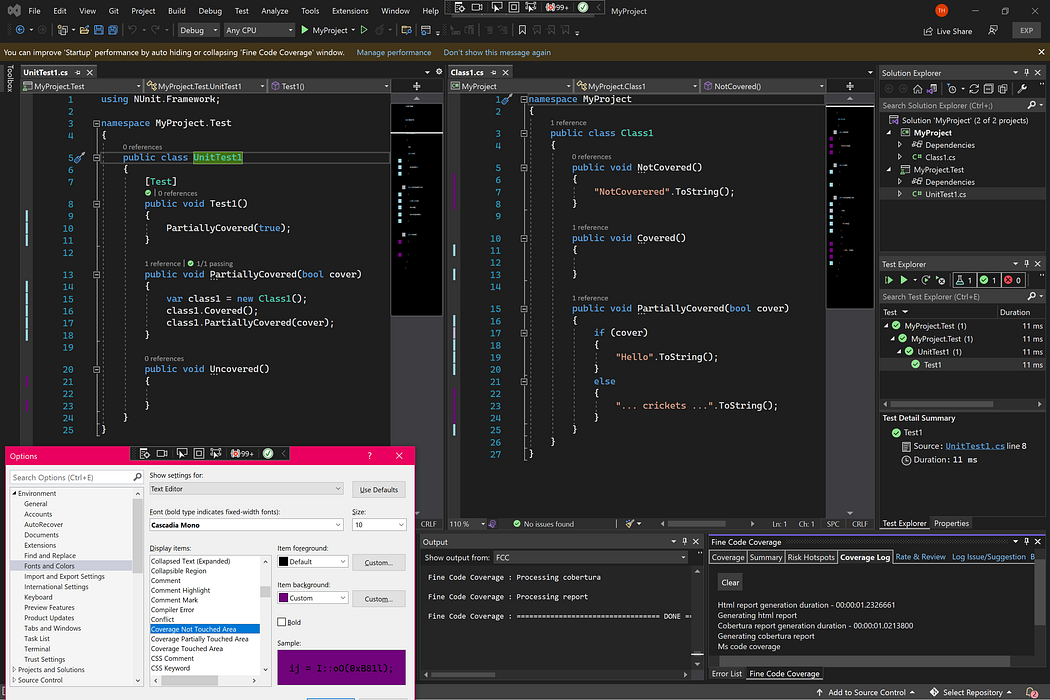
FineCodeCoverage is a powerful NuGet package designed to help developers measure the code coverage of their .NET applications with ease. With FineCodeCoverage, you can generate detailed coverage reports that highlight areas that are well-covered by tests, as well as those that are not. By color-coding these areas, the tool makes it easy to identify the parts of your codebase that require more testing. Example below:
4. AutoFixture
AutoFixture simplifies generating random test data for .NET developers by automatically filling properties and fields with random values. AutoFixture.AutoMoq is an extension that integrates AutoFixture with Moq to create an auto-mocking container. It simplifies dependency management in your application by automatically creating and injecting mock objects as needed when you specify the interfaces or classes you want to inject, making it easier to write unit tests.
Example:
[Fact]
public void AutoFixtureTest()
{
    // Arrange
    var fixture = new Fixture().Customize(new AutoMoqCustomization());

    var expectedResult = fixture.Create<string>();
    var sut = fixture.Create<StockService>();
    // Act
    var result = sut.GetStocks();
    // Assert
    Assert.Equal(expectedResult, result);
}
5. FluentAssertion
FluentAssertions is an open-source assertion library for .NET developers that provides a fluent API for writing and reading assertions in unit tests. It offers a wide range of assertion methods that cover almost any scenario, integrates with popular testing frameworks, and supports multiple assertion styles. Overall, FluentAssertions makes writing clear, concise, and expressive unit tests easier and more efficient.
Example:
// Without FluentAssertions
Assert.Equal(expectedResult, result);
// With FluentAssertions
result.Should().Be(expectedResult);
6. FluentValidations
FluentValidation is an open-source .NET library that provides a simple and expressive API for defining validation rules. It allows developers to chain together reusable validation rules, creating complex validation logic that is easy to read and maintain. With built-in validation rules for common scenarios and support for custom rules, FluentValidation simplifies the process of writing and managing validation rules for .NET applications.
Example:
public class StockValidator : AbstractValidator<Stock>
{
    public StockValidator()
    {
        RuleFor(o => o.Amount).GreaterThan(0);
        RuleFor(o => o.AccountId).NotEmpty();
        RuleFor(o => o.ClientId).NotEmpty();
    }
}
7. NodaTime — Better Date and Time Handling
NodaTime is an open-source date and time library for .NET that provides a more comprehensive and flexible alternative to the built-in DateTime and DateTimeOffset classes. It offers support for different time zones, calendars, and precision, and allows developers to work with date and time values in a way that is independent of any particular time zone or calendar system. With a comprehensive database of time zone information and support for different calendars, NodaTime makes it easier for developers to work with date and time values in a more accurate, consistent, and culturally-aware way.
Example:
// Instant represents time from epoch
Instant now = SystemClock.Instance.GetCurrentInstant();

// Convert an instant to a ZonedDateTime
ZonedDateTime nowInIsoUtc = now.InUtc();

// Create a duration
Duration duration = Duration.FromMinutes(3);

// Add it to our ZonedDateTime
ZonedDateTime thenInIsoUtc = nowInIsoUtc + duration;

// Time zone support (multiple providers)
var london = DateTimeZoneProviders.Tzdb["Europe/London"];

// Time zone conversions
var localDate = new LocalDateTime(2012, 3, 27, 0, 45, 00);
var before = london.AtStrictly(localDate);
Hope this helps!