How good is ChatGPT at C# code performance optimizations
Originally published on Medium · January 26, 2023 — examples target the tooling of that time.
Optimizing code for performance usually demands a solid grasp of the language's internals, which made me curious whether ChatGPT could actually hold its own here. So I picked three real C# performance problems and asked it directly: can you make this code run faster?
Below are its answers, my own hand-written alternatives, and the BenchmarkDotNet numbers to settle who actually won.
Task One — checking if an array contains an enum value
The fastest way is to use a HashSet instead of an array.
Task code:
private readonly PokerHand[] _pokerHands =
{
    PokerHand.Flush,
    PokerHand.FourOfAKind,
    PokerHand.HighCard,
    PokerHand.Pair,
};

public bool ListContains()
{
    return _pokerHands.Contains(PokerHand.HighCard);
}
My solution:
private readonly HashSet<PokerHand> _pokerHandsHashSet = new ()
{
    PokerHand.Flush,
    PokerHand.FourOfAKind,
    PokerHand.HighCard,
    PokerHand.Pair,
};

public bool HashSetContains()
{
    return _pokerHandsHashSet.Contains(PokerHand.HighCard);
}
ChatGPT answer:
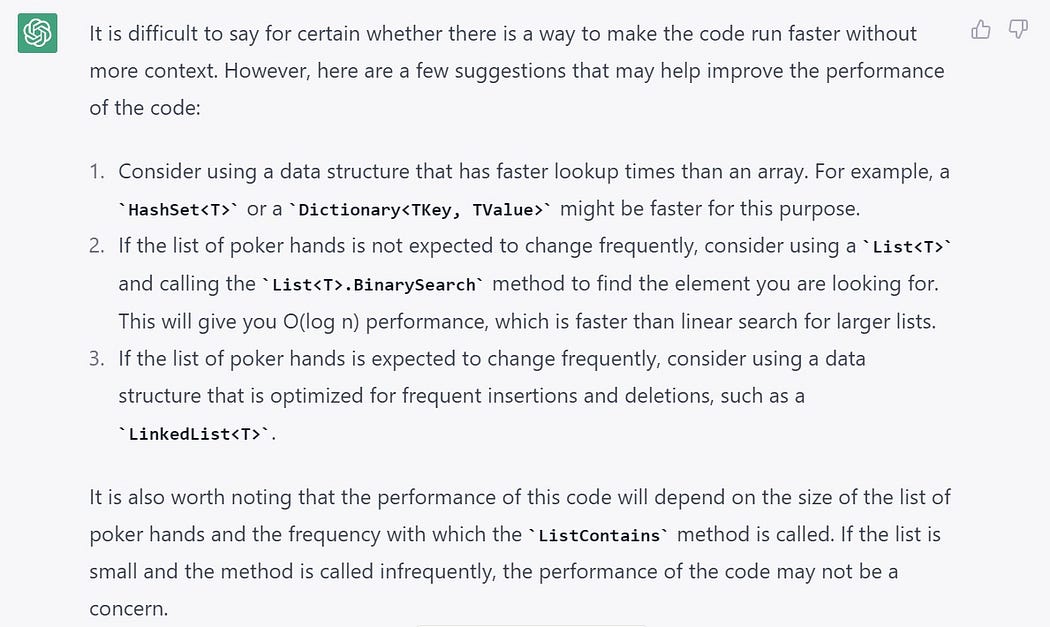
As you can see, the first suggestion from ChatGPT is to use a HashSet. Great!
To prove that it is faster, here is the benchmark performance of the two solutions:
| Method | Mean | Error | StdDev | Allocated | |---|---|---|---|---| | ListContains | 5.718 ns | 0.1384 ns | 0.2632 ns | - | | HashSetContains | 3.161 ns | 0.0426 ns | 0.0356 ns | - |
Task Two — building a collection, then iterating over it
The solution that performs fastest is to use an array. IEnumerable performs slowly because to get the next item you need to ask a function to retrieve it. With arrays you keep the items in memory. List does not work as well, because of array bound checks.
Task code:
public void IEnumurableConsumer()
{
    var total = 0;
    foreach (var item in IEnumurable())
    {
        total += item;
    }
}

public IEnumerable<int> IEnumurable()
{
    for (var i = 0; i < 1_000_000; i++)
    {
        yield return i;
    }
}
My solution:
public void ArrayConsumer()
{
    var total = 0;
    foreach (var item in Array())
    {
        total += item;
    }
}

public int[] Array()
{
    var result = new int[1_000_000];
    for (var i = 0; i < 1_000_000; i++)
    {
        result[i] = i;
    }

    return result;
}
ChatGPT answer:
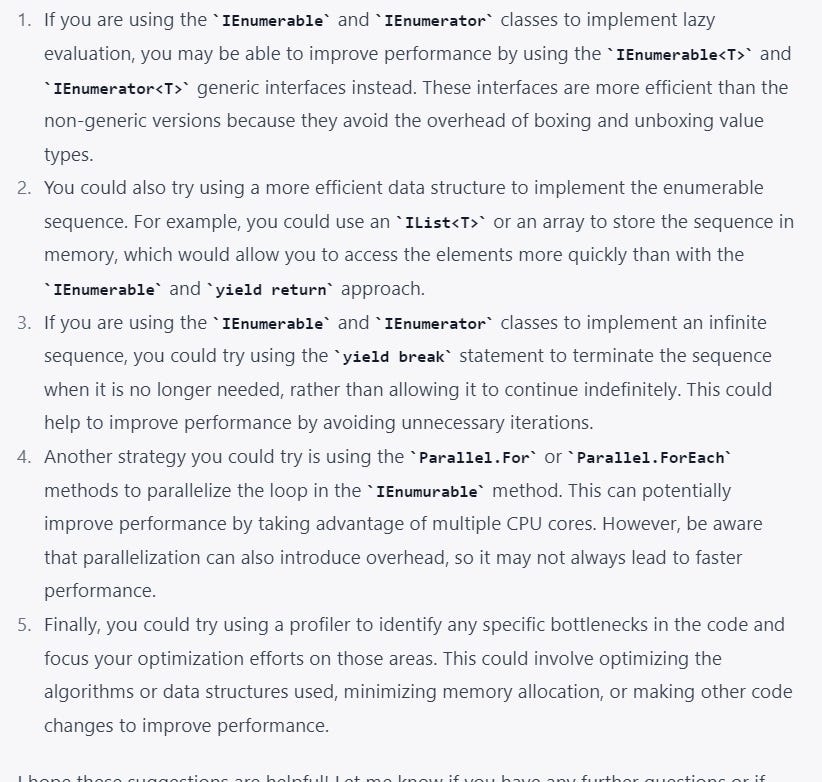
With the second suggestion it got the correct answer. With the first and third suggestions, ChatGPT did not recognize that the IEnumerable was already of type int and that it has a limit. The fourth suggestion doesn't really help, since the overhead of Parallel.For would just make the code run slower. Nevertheless, it did get one correct answer. One thing to point out — it did not even mention Span<int> as an option. Not ideal.
Here is my solution with Span<int>:
public void ArraySpanConsumer()
{
    int data = 0;
    Span<int> stackSpan = stackalloc int[1_000_000];
    for (int ctr = 0; ctr < stackSpan.Length; ctr++)
        stackSpan[ctr] = data++;

    int stackSum = 0;
    foreach (var value in stackSpan)
        stackSum += value;
}
And also, ChatGPT's solution with Parallel.For:
public void ParallelForConsumer()
{
    var array = ParallelForEach();
    var total = 0;

    Parallel.For(0, array.Length, x => { total += x; });
}

public int[] ParallelForEach()
{
    var array = new int[1_000_000];
    Parallel.For(0, 1_000_000, i => { array[i] = i; });
    return array;
}
And here is the benchmark performance:
| Method | Mean | Error | StdDev | Allocated | |---|---|---|---|---| | IEnumurableConsumer | 3,256.1 ns | 49.74 ns | 41.53 ns | 32 B | | ArrayConsumer | 835.5 ns | 10.77 ns | 9.55 ns | 4,024 B | | ArraySpanConsumer | 1,791.9 ns | 15.63 ns | 14.62 ns | - | | ParallelForConsumer | 21,048.1 ns | 202.26 ns | 189.20 ns | 8,717 B | | ListConsumer | 2,509.9 ns | 34.89 ns | 29.14 ns | 8,424 B |
As you can see, Array is the fastest and Parallel.For is the slowest. As an option, using a span array is great because it uses 0 memory and is very fast. All in all, not impressed with ChatGPT's solution to this problem.
Task Three — parsing a date out of a string
Extract the day, month, and year from a string. The solution is to use a ReadOnlySpan<char> because it allocates a lot less memory than several strings.
Task code:
public (int day, int month, int year) GetDateFromString()
{
    var date = "02 01 2022";
    var dayString = date.Substring(0, 2);
    var monthString = date.Substring(3, 2);
    var yearString = date.Substring(6, 2);
    var day = int.Parse(dayString);
    var month = int.Parse(monthString);
    var year = int.Parse(yearString);
    return (day, month, year);
}
My solution:
public (int day, int month, int year) GetDateFromStringReadOnlySpan()
{
    ReadOnlySpan<char> date = "02 01 2022";
    var dayString = date.Slice(0, 2);
    var monthString = date.Slice(3, 2);
    var yearString = date.Slice(6, 2);
    var day = int.Parse(dayString);
    var month = int.Parse(monthString);
    var year = int.Parse(yearString);
    return (day, month, year);
}
ChatGPT answer:
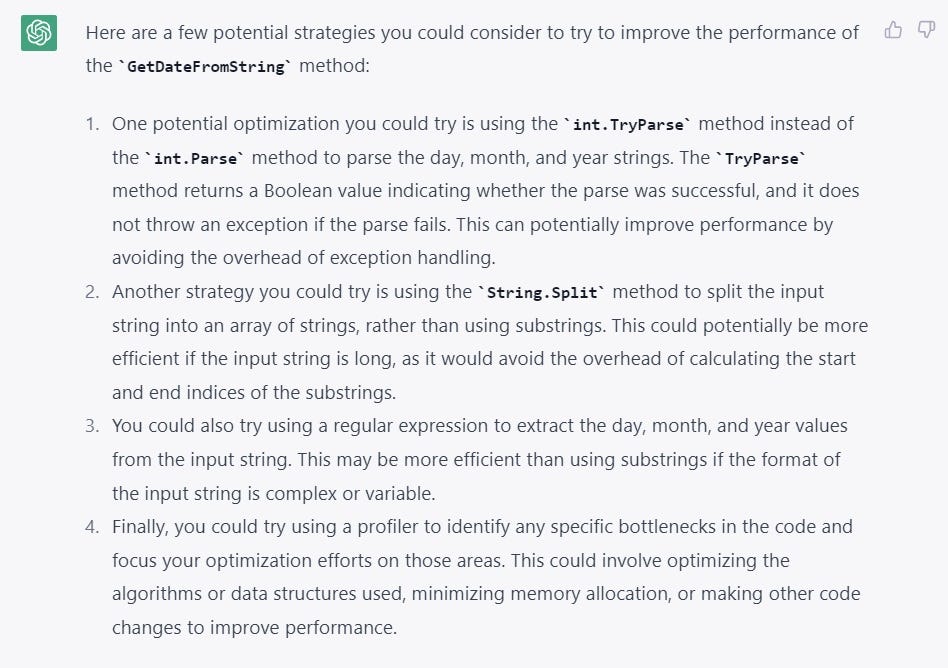
The first suggestion doesn't really help with performance, because it relates to error handling. Although using int.TryParse would make the application faster in the presence of potential errors, that doesn't really apply here. The third suggestion was to use regular expressions — ChatGPT is technically correct, but that would not really improve the performance of this code. The second suggestion was to split the string, so let's try it.
Solution according to ChatGPT:
public (int day, int month, int year) GetDateFromStringChartGpt()
{
    var date = "02 01 2022";
    var dateStringArray = date.Split();
    var day = int.Parse(dateStringArray[0]);
    var month = int.Parse(dateStringArray[1]);
    var year = int.Parse(dateStringArray[2]);
    return (day, month, year);
}
And as always, here are the benchmark results:
| Method | Mean | Error | StdDev | Allocated | |---|---|---|---|---| | GetDateFromString | 40.40 ns | 0.441 ns | 0.391 ns | 96 B | | GetDateFromChartGpt | 66.06 ns | 1.215 ns | 1.137 ns | 144 B | | GetDateReadOnlySpan | 23.55 ns | 0.387 ns | 0.362 ns | - |
As you can see, ChatGPT's solution is the slowest and uses the most memory. I was quite surprised it did not mention ReadOnlySpan as a solution. I would say the AI failed on this task.
Conclusion
All in all, I am quite impressed with the results. As a software developer, I see myself using ChatGPT instead of Google to find solutions to errors, but for more specific tasks, a developer with experience will know what solution works best.
Hope this helps!