Originally published on Medium · April 5, 2023 — examples target the tooling of that time.
Component tests sit in an awkward middle ground that a lot of .NET teams skip past entirely, going straight from unit tests to full integration tests. That's a mistake. Below I walk through what a component test actually is, how it differs from the unit and integration tests you're probably already writing, and a working example built around WebApplicationFactory that you can adapt to your own ASP.NET project.
What Counts as a Component Test?
A component test limits the scope of the exercised software to a portion of the system under test, manipulating the system through internal code interfaces and using test doubles to isolate the code under test from other components.
In contrast to unit testing, which focuses on testing small portions of code, component testing involves testing individual software features in isolation using mocked external dependencies. This approach allows for thorough testing of each component in a controlled environment, without interference from other parts of the system. By isolating the component being tested, potential issues can be identified and addressed more effectively, leading to a more reliable and robust system overall.
The diagram below illustrates the boundaries of component and unit tests:
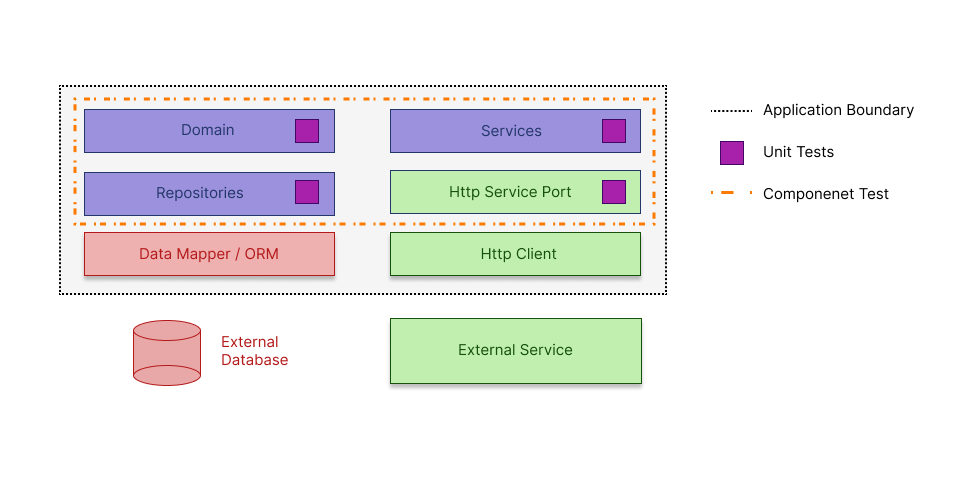
Component Tests vs. Integration Tests vs. Unit Tests
Unit tests are tests that test the functionality of a single unit of code. They are designed to test the smallest possible units of code, such as methods and functions.
Integration tests, on the other hand, evaluate the proper functioning of an application's supporting infrastructure, including the database, file system, and external dependencies.
Component tests, as previously mentioned, test individual components in isolation.
Writing Component Tests, Step by Step
1. Identify the component to be tested. The component should be well-encapsulated, meaning it should have clearly defined inputs and outputs. I will select PaymentController.
Controller code:
using System.ComponentModel.DataAnnotations;
using Mapster;
using Microsoft.AspNetCore.Mvc;
using Payment.Models.Request;
using Payment.Models.Response;
using Payment.Services;

namespace Payment.Controllers;

[ApiController]
[Route("api/[controller]")]
public class PaymentController : ControllerBase
{
    private readonly IPaymentService _paymentService;

    public PaymentController(IPaymentService paymentService)
    {
        _paymentService = paymentService;
    }

    [HttpGet]
    public async Task<PaymentResponse?> GetPaymentById([Required]int? id, CancellationToken ct)
    {
        var paymentModel = await _paymentService.GetPaymentById((int)id!, ct);
        return paymentModel?.Adapt<PaymentResponse>();
    }

    [HttpPost]
    public async Task GetPaymentById(PaymentRequest payment, CancellationToken ct)
    {
        await _paymentService.ProcessPayment(payment, ct);
    }
}
Program.cs:
using Microsoft.EntityFrameworkCore;
using Payment.Database;
using Payment.Repositories;
using Payment.Services;
using System.Text.Json.Serialization;

var builder = WebApplication.CreateBuilder(args);

builder.Services.AddControllers()
    .AddJsonOptions(options =>
    {
        options.JsonSerializerOptions.Converters.Add(new JsonStringEnumMemberConverter());
    });

var dbConnectionString = builder.Configuration.GetConnectionString("DbConnection");
builder.Services.AddDbContext<DatabaseContext>(options =>
    options.UseMySql(dbConnectionString,
        new MariaDbServerVersion(ServerVersion.AutoDetect(dbConnectionString)))
        .UseLazyLoadingProxies());

builder.Services.AddEndpointsApiExplorer();
builder.Services.AddSwaggerGen();
builder.Services.AddScoped<IPaymentService, PaymentService>();
builder.Services.AddScoped<IOrderService, OrderService>();
builder.Services.AddScoped<IPaymentRepository, PaymentRepository>();

builder.Services.AddHttpClient("order-client");

var app = builder.Build();

if (app.Environment.IsDevelopment())
{
    app.UseSwagger();
    app.UseSwaggerUI();
}

app.UseHttpsRedirection();

app.UseAuthorization();

app.MapControllers();

app.Run();

public partial class Program { }
2. Create a test project. Create a separate test project to write the component tests. This will help to separate the production code from the test code.
3. Add the Microsoft.AspNetCore.Mvc.Testing NuGet package to your project. You can do this using the NuGet Package Manager in Visual Studio or by using the following command in the CLI:
dotnet add package Microsoft.AspNetCore.Mvc.Testing
The Microsoft.AspNetCore.Mvc.Testing NuGet package provides a set of classes and methods that simplify the creation of tests for controllers and views, allowing developers to write tests that simulate HTTP requests and verify the behavior of their application's endpoints. By adding this package to a project, developers can save time and effort in setting up their testing infrastructure, as much of the boilerplate code required for component testing is provided by the package.
4. Create a new class in your test project and name it CustomWebApplicationFactory. This class will inherit from the WebApplicationFactory class provided by the Microsoft.AspNetCore.Mvc.Testing package. Use test doubles, such as stubs, fakes, and mocks, to isolate the code under test from other components. This will help to provide a controlled testing environment for the component, triggering any applicable error cases in a repeatable manner. I changed the external database with an in-memory database and added some test data.
Example:
using Microsoft.AspNetCore.Hosting;
using Microsoft.AspNetCore.Mvc.Testing;
using Microsoft.EntityFrameworkCore;
using Microsoft.Extensions.DependencyInjection;
using Payment.Database;
using Payment.Models.Entities;

namespace ComponentTests;

public class CustomWebApplicationFactory<TProgram>
    : WebApplicationFactory<TProgram> where TProgram : class
{
    protected override void ConfigureWebHost(IWebHostBuilder builder)
    {
        builder.ConfigureServices(services =>
        {
            var dbContextDescriptor = services.SingleOrDefault(
                d => d.ServiceType ==
                     typeof(DbContextOptions<DatabaseContext>));

            services.Remove(dbContextDescriptor);

            services.AddDbContext<DatabaseContext>(options =>
            {
                options
                    .UseInMemoryDatabase("Test-database")
                    .UseLazyLoadingProxies();
            });

            using var scope = services.BuildServiceProvider().CreateScope();
            var context = scope.ServiceProvider.GetRequiredService<DatabaseContext>();

            context.Payments.Add(new PaymentEntity() { Id = 1, Amount = 15 });

            context.SaveChanges();
        });

        builder.UseEnvironment("Development");
    }
}
5. Test the component. Write the component tests, ensuring that all possible scenarios are covered. This includes testing for expected behavior, as well as error cases.
using System.Net.Http.Json;
using Payment.Models.Response;
using Xunit;

namespace ComponentTests;

public class PaymentControllerTests : IClassFixture<CustomWebApplicationFactory<Program>>
{
    private readonly HttpClient _client;

    public PaymentControllerTests(CustomWebApplicationFactory<Program> factory)
    {
        _client = factory.CreateClient();
    }

    [Fact]
    public async Task TestEndpoint()
    {
        // Act
        var response = await _client.GetAsync("/api/Payment?id=1");

        // Assert
        response.EnsureSuccessStatusCode();
        var payment = await response.Content.ReadFromJsonAsync<PaymentResponse?>();
        Assert.Equal(15, payment.Amount);
    }
}
Conclusion
Component testing is an essential part of ensuring that an application works as expected. By testing components in isolation, developers can identify issues with specific components and ensure that each component behaves as expected. In an ASP.NET application, developers can follow the steps outlined above to write effective component tests and ensure the stability and reliability of the application.