Originally published on Medium · March 25, 2023
Good unit tests catch regressions before your users do, but a lot of C# test suites end up brittle, slow, or just plain hard to read. Over the years I've settled on a handful of habits that consistently make tests easier to write and trust.
Below are the practices I reach for on every new feature class, with code examples for each one.
1. Start with a test class stub
I always make it a point to create a test class whenever I create a new feature class. To begin with, I jot down a few comments about the expected functionality of the feature class, while for the test class, I note down any edge cases that come to mind once I envision the feature class.
While ideally, I would prefer to use TDD. TDD is a software development process where a failing automated test is written before any production code. The developer writes the minimum amount of code to pass the test, ensuring that the code is thoroughly tested and meets the expected functionality and repeats the process with a new failing test.
While TDD is an ideal approach, some developers may find it challenging to implement in practice. In such cases, it is important to have a process that works best for the individual developer and their team.
Here is how I like to start a test class:
public class PaymentServiceTests
{
    //1. Payment state should be PartiallyProcessed if Payment
    //   amount does not match sum of Transaction Amount
    //2. Payment should throw exception when sum of Transaction
    //   amount is higher that Payment amount
}
2. Test one thing at a time
Tests should focus on testing one aspect of the code at a time. This makes it easier to identify and isolate bugs. Here is an example of a test that focuses on one aspect of the code:
[Fact]
public void GetStatus_ReturnsPartiallyProcessed_WhenAmountsDoNotMatch()
{
    // Arrange
    var payment = new PaymentModel()
    {
        Id = 1,
        Amount = 100,
        Transactions = new List<TransactionModel>()
        {
            new ()
            {
                Amount = 10
            }
        }
    };

    // Act
    var result = payment.GetPaymentStatus();

    // Assert
    Assert.Equal(PaymentStatus.PartiallyProcessed, result);
}
3. Generate test data instead of hand-rolling it
Test data generators can create randomized test data, reducing the amount of boilerplate code needed to set up test data. This ensures that tests are not biased towards certain input values. Here is an example of using a test data generator with AutoFixture:
[Fact]
public void GetStatus_ReturnsPartiallyProcessed_WhenAmountsDontMatch()
{
    // Arrange
    var fixture = new Fixture();

    var payment = fixture.Create<PaymentModel>();

    // Act
    var result = payment.GetPaymentStatus();

    // Assert
    Assert.Equal(PaymentStatus.PartiallyProcessed, result);
}
4. Use mock objects
Mock objects are objects that simulate the behavior of real objects. They can be used to isolate code for testing and ensure that tests are deterministic. Here is an example of using a mock object:
[Fact]
public async Task GetPayment_RepositoryCalled()
{
    // Arrange
    var paymentRepository = new Mock<IPaymentRepository>();
    var orderService = new Mock<IOrderService>();
    var sut = new PaymentService(paymentRepository.Object, orderService.Object);

    // Act
    await sut.GetPaymentById(1, default);

    // Assert
    paymentRepository.Verify(x=> x.GetPaymentById(1, default),Times.Once);
}
One issue with this approach is that what if the PaymentService requires another service to be injected? A solution described below.
5. Use Auto-mocking Container
Dependency injection can help simplify testing by decoupling the code from its dependencies. Using auto-mocking container like AutoFixture.AutoMoq can make it easy to create mock objects and inject them into the code being tested. Here is an example:
[Fact]
public async Task GetPayment_RepositoryCalled()
{
    // Arrange
    var fixture = new Fixture().Customize(new AutoMoqCustomization());
    var paymentRepository = fixture.Freeze<Mock<IPaymentRepository>>();
    var sut = fixture.Create<PaymentService>();

    // Act
    await sut.GetPaymentById(1, default);

    // Assert
    paymentRepository.Verify(x => x.GetPaymentById(1, default), Times.Once);
}
6. Track code coverage
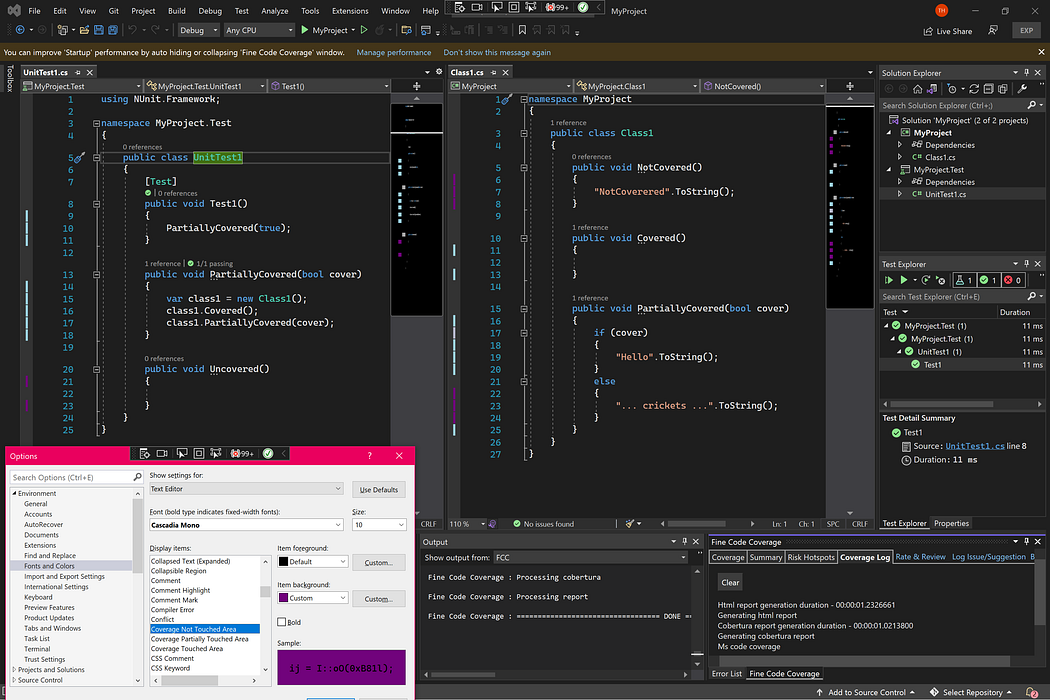
Code coverage analysis is a useful practice to ensure that your unit tests are comprehensive and cover all the important areas of your code. A tool like Fine Code Coverage can help you visualize code coverage by coloring the areas of your code that are covered by unit tests and those that are not.
7. Test edge cases
Edge cases are input values that are on the edge of what the code is designed to handle. Testing edge cases can help identify issues with boundary conditions and corner cases. Here is an example of testing an edge case:
[Fact]
public void GetPaymentStatus_ShouldReturnZero_WhenGivenEmptyList()
{
    // Arrange
    var payment = new PaymentModel
    {
        Id = 1,
        Amount = 100,
        Transactions = new List<TransactionModel>()
    };

    // Act
    var result = payment.GetPaymentStatus();

    // Assert
    Assert.Equal(PaymentStatus.Created, result);
}
8. Verify exception behavior
Testing for exceptions is a critical part of unit testing, as it helps ensure that code handles unexpected situations gracefully. When writing unit tests, it's essential to test for both expected and unexpected exceptions.
To test for an expected exception, use the Assert.Throws() method, which expects an exception of a specified type to be thrown by the code being tested. Here's an example:
[Fact]
public async Task GetPayment_ThrowsException()
{
    // Arrange
    var fixture = new Fixture().Customize(new AutoMoqCustomization());
    var sut = fixture.Create<PaymentService>();

    // Act

    await Assert.ThrowsAsync<ArgumentException>(async () =>
        await sut.GetPaymentById(1, default));
}
If you found this article helpful, be sure to check out my article on integration tests as well.
Thank you for reading!